灵越13 7352特别版晒单Inspiron 13 7352 Special Edition: A Show-and-Tell
官翻版戴尔灵越13 7352变形本晒单:惊艳的钻石切割外观,8小时以上的续航,与1.66公斤的重量。A show-and-tell of the refurbished Dell Inspiron 13 7352 convertible: striking diamond-cut looks, eight-plus hours of battery, and 1.66 kilograms.
DELL New Inspiron 13 Special Edition
Inspiron,亦即中国用户无比熟悉的戴尔灵越系列。随着变形本的发展,灵越也推出了主打性价比的Inspiron 7000系列变形本。本次晒单的是13英寸系列变形本的第三代产品,灵越13 7352特别版。7352并未在硬件配置上进行升级,而是对前代7348使用上令人诟病的问题进行了一定程度的解决,这也令7352获得了Hardware.com和ComputerShopper的推荐奖…
dell001#

配置#
7352的硬件配置与7348并没有相异之处,为了行文完整在此仍然列出。
处理器 第五代智能英特尔®酷睿™i5-5200U 处理器
内存 8GB DDR3L 1600MHz (8GBx1)
硬盘 500GB 5400RPM SATA 硬盘
显示屏 13.3-英寸 HD (1920 x 1080) Truelife LED背光触控显示器含宽视角 (IPS)
英文背光键盘
无线 Intel® 7265AC + BT4.0 [802.11ac + 蓝牙 4.0, 双频 2.4&5GHz, 2x2]
摄像头 高清(720P)网络摄像头,带双阵列麦克风
电池 43瓦时3芯锂离子电池
外接端口 全尺寸HDMI™ 1.4a端口,2个USB 3.0端口(其中1个USB 3.0端口具有Power Share功能),1 个USB 2.0端口,安全插槽,介质卡(SD、MMC),1个耳机/麦克风组合插孔
重量 1.66千克
厚度 19毫米
选购#
这个要从上一台电脑惠普6100tx说起。6100是个好机子,性能上毫不妥协—第二代i7处理器和2G显存的6770m显卡,内存和硬盘还都能自己换。可是这玩意儿在体积和重量上也没有妥协 两公斤多的机身重量,加上一块儿凑热闹的一公斤左右的电源变压器,带出门实在是对体力的一个挑战。刚买的时候续航还能撑上几个小时,偶尔还能把电源留在家里减轻一下负担。到现在使用了五年之后电池已然成为摆设,出门不带电源分分钟罢工给你看 。忍无可忍,在某一个炎热的下午我决定抛弃原配寻找新的幸福。于是挑选的标准也很简单了:
1,轻薄
2,长时续航
3,主流配置我一度十分中意华硕新出的超极本UX305,此物重量仅仅1.2kg,厚度也只有12mm。台湾代购的到手价也就五千多块 。可惜用了CoreM处理器,在实体店体验了一把CoreM之后认为无法满足我日益增加的工zhuang作bi需求,也就作罢了。后来又看上了HP的Spectre。这机子也挺不错的,1.5kg左右的重量,代购价格在六千五左右。续航有网友测试达到了十小时左右,异常心动..这款朋友刚好买了实物,那个硕大无朋的触摸板确实震惊到了 ..另外考虑用了快十年惠普电脑了,也想换换口味。于是继续作罢…一路兜兜转转也就目光也就自然的转移到XPS13身上了。话说XPS是真好啊..(没错我作为一个朴实的乡下人在摸钱包之前看到啥都挺心动的其实..)边框那么窄..上论坛爬了文,发现小问题还是有的…不过这么高的颜其实已经准备抛弃一切购买它了..但是上淘宝和狗东一搜价格…即使是海淘也是挺贵的,于是再一次作罢了..期间又看了acer的某款超级丑的变形本,又看了yoga,不过楼主对它们的外形都不是很感冒,在此不表。就在百无聊赖逛论坛的时候,发现了某位网友发的灵越7348的晒单,顿时惊为天人。卧槽,这货颜值确实还行不说,居然配置给的也很厚道。而且到手居然才五千块(这个似乎是重点)瞬间无比心动,滚到淘宝搜现货。7348现货没找到,倒是被我找到了7348的升级版,也就是本次晒单主角的现货7352。心急啊..也不管它是官翻了,立即下单
外观#
买的是官翻版,加之已经用了一段时间了,伪开箱就不搞了.. 话说官翻配件给的真的很随性啊..就给了个电源…还有一个薄薄的保修书…全家福就不放了..直接上本体吧 A面。单从A面看,其实完全不会联想到之前的两代。不但材质发生了改变,往常圆润的造型也被一并修改。前辈使用的银色光面材质被换成了近似深灰的黑色磨砂,据称改善了诟病已久的掉漆问题。不过新的材质真心是指纹收集器,一不小心就印满指纹,而且还不太好清理..
 来张正面图。嗯,就是长这样。这张图的色差会比较小,比较接近真实的颜色。
 给logo一个特写。可以发现前辈橡胶材质的logo已经被更显高档的金属材质替代。
 侧面看会比较明显,是凹下去的。不过依然不会发光。咦,我为什么要说依然。
 看看右侧。可以看到放了一个SD读卡器以及一个USB2.0接口。然后是音量键与电源。对比前辈,新款取消了原来收纳在机身之内的触摸笔,另外也挪动了扬声器的位置。关于扬声器位置的改变,后文会有提到。
 对接口的作用都进行了标注,其实我反而觉得什么也不写会比较简洁大方。
 电源和音量键。可以看到缝隙还是比较大的,做工并没有特别精致。另外按钮按下之后阻尼偏大,键程偏短,手感也不是特别好。不过也可以理解,毕竟也要考虑到防止误触摸。
 不起眼的硬盘读写指示灯。会注意这玩意儿的请举手..
 看看左边。大部分接口集中在了机身的左侧。3.5mm二合一音频/USB3.0接口/HDMI接口/电源接口/防盗锁接口。当然,即使作为一只不怎么薄的超极本,RJ45网口也依然是欠奉的。和前辈相比变化的依然是扬声器的位置。
 两个USB3.0接口。用蓝色字体进行了标注。话说这个实际传输速率可比我五年前惠普的所谓3.0要快上不少。
 电源接口的特写。话说我为什么要给这玩意儿一个特写
 枪灰色的转轴。一样也很容易脏,不过比起A面来,好打理多了。前代似乎是个长方形,而这一代并不是一个规则的形状。形状的改变是对旋转有所帮助吗?
 D面能够完整的从结构上看出与前辈的不同。大大的REFURBISHED标签注明了这台笔电的身份..你是用过哒!
 不过预装的Windows8 Pro依然奉上
 散热的出风口向下进行了移动,使得大部分使用情况下,出风的方向不再正对着用户,或者A面。
 由于对边角增加了类似钻石切割的处理,扬声器的出口得以向下移动,避免了变形旋转使用时可能出现的堵住扬声器的情况。也让笔电的侧面更加简洁。
 很普通的底部螺丝,整机也没有易碎贴。非常容易拆卸..大概是DELL知道大家都会拆开来换个SSD进去吧..
 最后拿个一元硬币对比一下,厚度也就那样呗..—外观的部分就写到这里,然后让我们把它打开…
 有没有Macbook Pro的即视感..而且比前代更像了..
 正面观,这样看总觉得电脑好厚..应该是D面的切割所致
 侧面观,侧面倒是显得还蛮纤薄的
 点亮屏幕看一下。边框还是很宽的。主要是为了平板模式下的握持吧..
 给转轴一个特写。枪灰色的转轴在使用形态确实比前代与C面要和谐多了。
 Windows键,但是楼主发现即使平板模式,这个键的使用频率也是很低..大部分情况都是..卧槽怎么又卡了,屏幕按了怎么没反应,次奥,按一下windows键
 键盘。经过楼主的对比发现键盘和前代相比并没有手感和材质上的改变 。
 可以看到键帽的高度。
 可以看到DELL对键盘的处理还是比较细致的,边缘的保护圈(虽然不知道保护个啥)在手掌与键盘之间的位置做了相应处理。
 和macbook真的很像啊喂,这不是什么好事吧
 DELL给键盘提供了两种亮度的背光,但是拍摄之后发现拍出来实在是没啥区别,就上一张图吧。
 触摸板。话说和基友对比之后发现触摸板并没有小到哪里去=。=…按下的手感比较生硬,不过也不怎么需要按就是。整个触摸板是磨砂材质,这就导致双指在触摸板上移动的时候,感觉有点酸酸麻麻怪怪的..
变形#
嗯,下面我就要开始变zhuang形bi了! 首先是180度模式。不过楼主从来没这么用过..想不到使用场景啊
 180度模式下的厚度。这样倒是满纤薄…
 270度模式。话说这其实都300度了吧..话说这个模式是我使用频率最高的模式了,放腿上看电影终于可以和出风口说拜拜了,赞MAX
 背面。十分和谐嘛。出风口的移动也使得270度模式下的散热得到了很大的提高。
 平板模式。话说1.66公斤的平板,用起来真的大丈夫?
 厚度。看起来更厚了啊喂..
 很不爽的一个问题,翘屏。按下去有点吱吱响,不知道是不是个体现象。
配件#
其实配件不就是个电源吗… 电源从前代的65w缩小到了45w,带来的是体积上的大幅缩小。从图中也可以看到,还不到一个巴掌大。
 依然是110-240v的宽幅电压,生产厂家是光宝。不过附带的125v电源线还是没敢用..
其他#
 上一个续航图,给大家看一下续航的改变 ..这该死的反光..不重新拍了…最后硬件什么的由于和前代完全没有变化,就不再做测试了。
总结#
外形: :本代造型的改变可以用惊艳来形容。钻石切割的边缘处理显得异常大气,相较前代而言廉价感也减少很多。即使带到星爸爸装逼也不输macbook、x1之流 。另外前代饱受诟病的掉漆问题也得到了很好的解决。
 :A面材质的处理仍然有待改进。D面的拆卸十分困难,而且D面也莫名的很沾指纹!使用: :360度旋转的屏幕使得笔电的用途得到了极大的扩展,床上桌上车上野外(排名不分先后)都可以用了 。中度使用情况下8小时+的续航对于这样价格和配置的笔电来说无可挑剔,发热量的控制做得也比较不错,很少有机会感受机身的热情。 :光面的显示屏在复杂的使用情况下很容易让人抓狂。平板模式有一定几率出现翘屏。其他的缺点似乎并不多了。实在要说的话单通道的内存确实对性能有所影响 。—总而言之呢四千多块买一个可以各种玩的笔电也不好意思要求啥自行车了,有处女情结的同学可以买全新版大概贵五百块。再多花一千块买i7版本以换取10%-20%左右的性能提升楼主个人呢是觉得不是很有必要。对比前代7348相同配置新款要贵一千左右,这个选择就是仁者见仁智者见智了。差距主要在外形和续航,楼主的建议是哪个看得顺眼就买哪个吧。
DELL New Inspiron 13 Special Edition
Inspiron, the series Chinese users know inside and out as Dell’s Lingyue line. As convertibles came into their own, Inspiron too rolled out the value-minded Inspiron 7000 series of convertibles. On display today is the third-generation product of the 13-inch convertible line, the Inspiron 13 7352 Special Edition. The 7352 brings no hardware upgrades; rather, it resolves, to a fair extent, the usability problems its predecessor the 7348 was criticized for, which is also what earned the 7352 recommendation awards from Hardware.com and ComputerShopper…
dell001#
Specs#
The 7352’s hardware differs in nothing from the 7348’s; for completeness I list it here all the same.
Processor 5th Generation Intel® Core™ i5-5200U processor
Memory 8GB DDR3L 1600MHz (8GBx1)
Hard drive 500GB 5400RPM SATA hard drive
Display 13.3-inch HD (1920 x 1080) Truelife LED-backlit touch display with wide viewing angle (IPS)
English backlit keyboard
Wireless Intel® 7265AC + BT4.0 [802.11ac + Bluetooth 4.0, dual-band 2.4&5GHz, 2x2]
Camera HD (720P) webcam with dual array microphones
Battery 43WHr 3-cell lithium-ion battery
Ports Full-size HDMI™ 1.4a port, 2 USB 3.0 ports (1 of which supports Power Share), 1 USB 2.0 port, security slot, media card reader (SD, MMC), 1 headphone/microphone combo jack
Weight 1.66 kg
Thickness 19 mm
Shopping Around#
This story has to start with the previous computer, the HP 6100tx. The 6100 was a good machine, with zero compromise on performance—a second-generation i7 and a 6770m graphics card with 2G of VRAM, plus memory and hard drive you could swap yourself. But the thing made zero compromise on size and weight either: a body of over two kilos, plus a power brick of roughly another kilo tagging along for the fun of it, made taking it out a genuine test of stamina. When it was newly bought, the battery could still hold out a few hours, and once in a while the charger could stay home to lighten the load. Now, after five years of use, the battery is pure decoration; leave the charger behind and it will go on strike for you within minutes. Past all endurance, on a certain sweltering afternoon I resolved to abandon the old missus and go looking for new happiness. The selection criteria were accordingly simple:
1, Thin and light
2, Long battery life
3, Mainstream specs. For a while I was thoroughly taken with ASUS’s newly launched UX305 ultrabook: a mere 1.2kg and only 12mm thick, landing at just five thousand and change via a Taiwan proxy buyer. A pity it ran a CoreM processor; after test-driving CoreM in a store, I judged it unequal to my ever-growing work (read: posing) needs, and let it go. Next I set my eye on HP’s Spectre. Also a rather fine machine: around 1.5kg, about sixty-five hundred by proxy purchase. One user measured the battery at around ten hours, and I was sorely tempted.. a friend happened to own one, and that touchpad of boundless enormity truly was a shock ..besides, having used HP computers for nearly ten years, I fancied a change of taste. So again I let it go… After all that wandering, my gaze naturally drifted to the XPS13. And my, the XPS really is fine.. (yes, as a simple country boy I am, in truth, tempted by pretty much everything I see before my hand reaches my wallet..) bezels that narrow.. I crawled the forums and found it does have its small problems… but with looks that stunning I was frankly ready to forsake everything and buy it.. then I searched the price on Taobao and JD… even buying it from overseas was steep, and so, once again, I let it go.. Along the way I also looked at some supremely ugly acer convertible, and at the yoga, but neither of their looks did much for me, so we’ll pass over them here. And then, while idly loafing around the forums, I came upon some user’s post showing off the Inspiron 7348, and was struck dumb. Well damn: not only were this thing’s looks genuinely decent, the specs it gave were downright generous too. And it landed for a mere five thousand kuai (this, it seems, being the point). Smitten on the spot, I rolled over to Taobao to search for stock. No 7348 to be found, but what I did find, in stock, was the 7348’s upgrade, the very star of this post: the 7352. Impatience won.. never mind that it was an official refurb, I placed the order at once
Looks#
Mine is the official refurb, and it has already seen some use, so there’ll be no pretend unboxing.. I must say the refurb accessories are handed out very casually indeed.. all you get is a charger… plus one thin little warranty booklet… so no family portrait of the box contents.. let’s go straight to the machine itselfThe A cover. Judging by the A cover alone, you would honestly never connect it to the previous two generations. Not only has the material changed, the once-rounded styling has been reworked along with it. The predecessors’ glossy silver finish gives way to a matte black verging on deep gray, said to remedy the long-criticized paint-flaking problem. The new material, though, is a true fingerprint collector: one careless touch and it’s stamped all over with prints, and they aren’t easy to wipe off either..Here’s a straight-on shot. Yep, this is what it looks like. The color cast in this photo is fairly mild, so it’s quite close to the real color.A close-up for the logo. You’ll notice the predecessor’s rubber logo has been replaced with metal, which reads far more upscale.It’s clearer from the side: the logo is recessed. Still doesn’t light up, though. Eh, why did I say still.A look at the right side. You can see an SD card reader and a USB 2.0 port, followed by the volume keys and the power button. Compared with its predecessor, the new model drops the stylus that used to stow away inside the body, and the speakers have been moved as well. More on the speaker relocation later.Every port has its function labeled; I actually think leaving them unmarked would look cleaner and more graceful.The power and volume keys. You can see the gaps run fairly wide; the workmanship is not especially fine. The buttons also press with too much resistance and too little travel, so they don’t feel great either. Understandable, though: accidental presses do have to be guarded against.The inconspicuous hard drive activity light. Hands up if you’d ever notice this thing..Now the left side. Most of the ports gather on the left of the body: 3.5mm two-in-one audio / USB 3.0 / HDMI / power / security lock. Naturally, even for a not-terribly-thin ultrabook, an RJ45 network port remains withheld. And what’s changed from the predecessor is, once again, the speaker placement.The two USB 3.0 ports, labeled in blue lettering. For what it’s worth, their actual transfer speed is a good deal faster than the so-called 3.0 on my HP of five years ago.A close-up of the power jack. Come to think of it, why am I giving this thing a close-upThe gunmetal-gray hinge. Just as quick to get grubby, but far easier to look after than the A cover. The previous generation’s seems to have been a rectangle, while this one is no regular shape at all. Does the change of shape actually help with the rotating?The D cover shows the full structural departure from its predecessor. A great big REFURBISHED label spells out this laptop’s identity.. you’ve been usedThe preinstalled Windows8 Pro is still served up, thoughThe cooling exhaust has been moved downward, so that in most use the airflow no longer blows straight at the user, or at the A cover.Because the edges now get a diamond-cut style treatment, the speaker outlets could be moved downward, avoiding the blocked-speaker situations that could arise when the machine is flipped and rotated in use. It leaves the laptop’s sides that much cleaner too.Perfectly ordinary bottom screws, and not a warranty-void sticker anywhere on the machine. Very easy to open up.. presumably DELL knows everyone will crack it open and slot in an SSD..Finally, a one-yuan coin for scale; the thickness is, well, what it is..—that’s it for the exterior, now let’s open it up…Getting Macbook Pro déjà vu yet.. it resembles one even more than the last generation did..The front view; seen this way the computer always looks awfully thick.. the D cover’s cut is probably to blameThe side view; from the side it actually looks rather slenderScreen on for a look. The bezels are still very wide, mainly for gripping in tablet mode, I suppose..A close-up for the hinge. In its working posture, the gunmetal-gray hinge truly does sit far more harmoniously with the C deck than the previous generation’s.The Windows key; though yours truly finds that even in tablet mode this key hardly ever gets used.. most of the time it goes.. well damn, frozen again, why won’t the screen respond to my taps, sheesh, fine, press the windows keyThe keyboard. After comparing, yours truly finds no change in feel or materials from the previous generation.You can see the height of the keycaps.You can see DELL has handled the keyboard rather carefully: the protective ring around the edge (protecting what, I couldn’t tell you) gets its own treatment where palm meets keyboard.It really does look like a macbook, hey, and that can’t be a good thing, can itDELL gives the keyboard backlighting in two brightness levels, but after shooting them I found the photos show practically no difference, so one picture will have to do.The touchpad. Compared against my buddy’s machine, it turns out the touchpad isn’t actually so small after all =。=… The click feels rather stiff, though you rarely need to click it anyway. The whole touchpad is a matte finish, which means that when two fingers glide across it, the sensation is faintly tingly, faintly numbing, altogether odd..
Transforming#
Right, time for me to begin trans(pose)formingFirst, 180-degree mode. Not that yours truly has ever used it this way.. I honestly can’t picture the use caseThe thickness in 180-degree mode. Like this it does look quite svelte…270-degree mode. Though honestly this is practically 300 degrees already.. Anyway, this is the mode I use most of all: movies on my lap, and at long last I can wave goodbye to the exhaust vent. Thumbs up MAXThe back. Very harmonious, no? Moving the vent has also greatly improved cooling in 270-degree mode.Tablet mode. Then again, a 1.66-kilogram tablet: using that is really daijoubu?The thickness. Hey now, it looks even thicker..One genuinely irritating problem: screen lift. Press it down and there’s a bit of a creak; whether that’s just my unit, I couldn’t say.
Accessories#
Well, aren’t the accessories really just the one charger…The charger shrinks from the previous generation’s 65w to 45w, and with it comes a drastic reduction in size. As the photo shows, it’s not even palm-sized.Still the wide 110-240v input range, manufactured by Lite-On. The bundled 125v power cord, though, I still haven’t dared to use..
Miscellany#
Here’s a battery-life readout, so you can all see how the battery life has changed ..that damned glare.. no, I’m not reshooting it… Lastly, since the hardware is entirely unchanged from the previous generation, I’ll skip the tests.
Verdict#
Design: : The styling change this generation deserves the word stunning. The diamond-cut edge treatment looks remarkably stately, and the whiff of cheapness is much reduced from the previous generation. Even carried into Starbucks for a spot of posing, it won’t lose face to the macbooks and x1s of the world. And the paint-flaking that plagued the previous generation has been well and truly fixed.: The A cover’s finish still leaves room for improvement. The D cover is extremely hard to remove, and for no reason at all it too is a magnet for fingerprints!In use: : The 360-degree rotating screen vastly expands what this laptop is for: bed, desk, car, the great outdoors (in no particular order), all now fair game. Eight-plus hours of battery under moderate use is beyond reproach for a laptop at this price and spec, and heat is kept in check nicely too; you rarely get a chance to feel the chassis’s warm affection. : The glossy display can drive you up the wall in tricky conditions. Tablet mode carries a certain chance of screen lift. Beyond that there don’t seem to be many faults left. If pressed, the single-channel memory does cost some performance.—All in all, for four-thousand-odd kuai you get a laptop you can play with every which way, so it would be bad manners to go asking for a bicycle on top. Those with a factory-sealed complex can buy the brand-new version for roughly five hundred more. Spending a further thousand on the i7 version to buy about 10%-20% more performance is, in yours truly’s personal view, not really necessary. Against the same-spec previous-generation 7348, the new model runs about a thousand dearer; that one is a to-each-their-own call. The gap is mainly looks and battery life, and yours truly’s advice: buy whichever your eye favors.
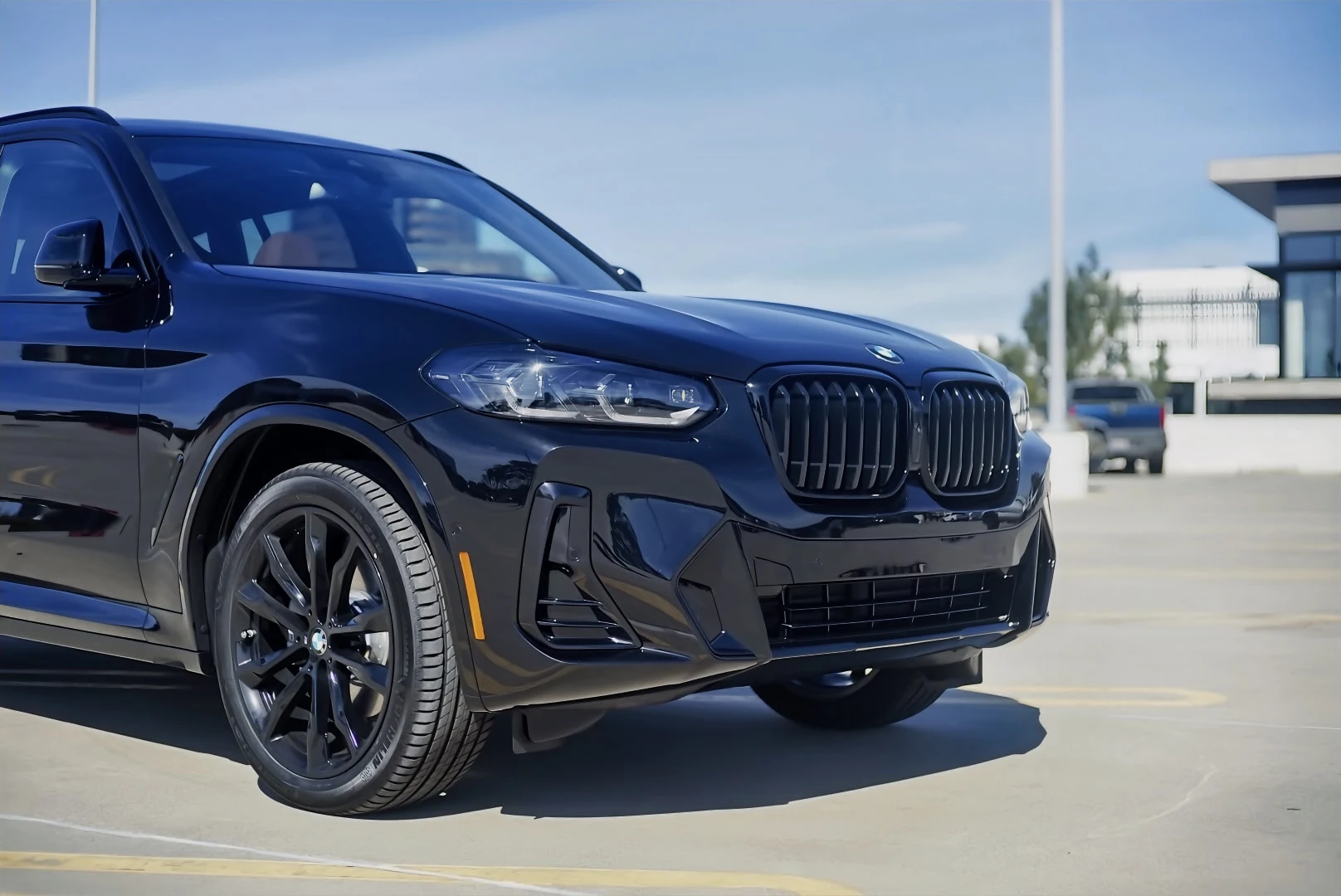
X3 中的克拉克·肯特The Clark Kent of X3s
订一台选满M运动套件的宝马X3 30i:一台暗自想成为X3M的克拉克·肯特,附提车照片。Ordering a BMW X3 30i in full M Sport dress: a Clark Kent that secretly wishes it were an X3M, with delivery photos.

Magic Mountain: my roller coaster riding logMagic Mountain: my roller coaster riding log
Some rides left me looking at the sky. Others left me wondering what the seat designers had against thighs.Some rides left me looking at the sky. Others left me wondering what the seat designers had against thighs.

Hyatt Tier WallHyatt Tier Wall
我的 Hyatt 酒店分级榜My personal Hyatt hotel tier list
Comments